
How to Create and Open SRT Files, the Complete Subtitle File Guide (2026)

Key takeaway: An SRT is a plain text file repeating "number + timecode + text," so Notepad can open and edit it. The fastest way to create one is auto-transcription followed by a quick cleanup, and if characters look broken, re-saving the file as UTF-8 fixes it.
Whether you're uploading captions to YouTube or handing subtitles to a collaborator, the file you'll meet is SRT. The name sounds technical, but it's just a simple text file. This guide covers the SRT structure, ways to create one, how to open it, and fixes for the common problems. If you're deciding between uploading a file and burning captions into the video, start with SRT upload vs burned-in captions.
What Is an SRT File?
SRT (SubRip Text) is the standard subtitle format. Open one up and it looks like this:
1
00:00:01,000 --> 00:00:03,500
Hi, today we're talking subtitles.

2
00:00:03,600 --> 00:00:06,200
SRT files are simpler than they sound.
Just three lines per block
A number, a time range (hours:minutes:seconds,milliseconds), and the text, separated by blank lines. The one gotcha: milliseconds are separated by a comma, not a period. The similar VTT format uses a period, and that single character causes most format errors.
Where it's used
Uploading captions to YouTube, importing subtitles into editing software, handing files off for translation, and displaying subtitles in players like VLC. Almost anywhere subtitles travel, SRT is the common currency.
Three Ways to Create an SRT
| Method | Time (10-min video) | Best for |
|---|---|---|
| Auto-transcription tool | 5-10 min (generate, then review) | Most cases, recommended |
| Download YouTube's auto captions | 10-20 min (needs cleanup) | Videos already on YouTube |
| Write by hand in Notepad | 1 hour or more | A few lines at most |
Generate with auto-transcription (recommended)
A tool that transcribes speech with timings produces an SRT in minutes. In bakecut, open the video, run transcription, fix any typos, and export as SRT. Tips for getting a cleaner transcript are in 5 ways to improve auto-caption accuracy.
Download and clean up YouTube's auto captions
If the video is already on YouTube, you can download the auto-generated captions from the subtitles menu in YouTube Studio. Expect missing punctuation and mistakes, so a cleanup pass is required.
Write it by hand
Type the format above into any text editor and save with the .srt extension. Setting timecodes by hand is more tedious than it sounds though, so this only makes sense for a few lines.
How to Open and Edit an SRT
Notepad is enough
An SRT is plain text, so Notepad on Windows or TextEdit on Mac opens it. If double-clicking doesn't work, right-click and choose Open With. For fixing typos, that's all you need.
For editing against the video
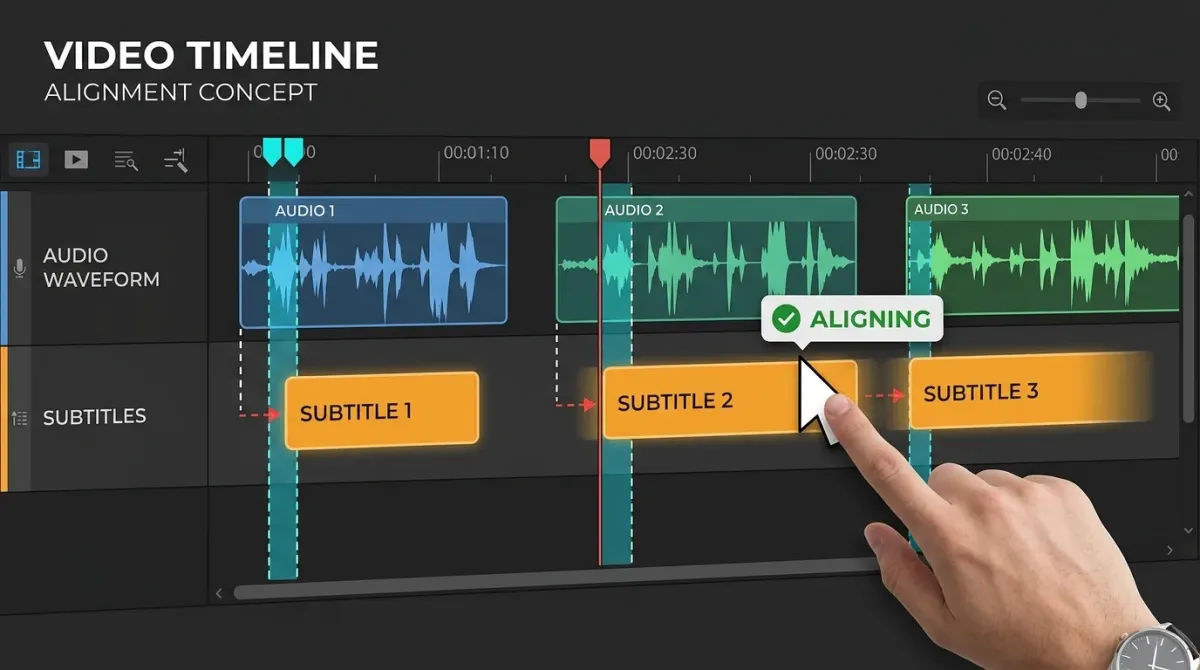
To adjust subtitles while watching the footage, a subtitle editor is far faster: drag cues on a timeline and preview instantly. Sync fixes especially are much quicker in an editor than in a text file.
Uploading an SRT to YouTube
YouTube Studio → Subtitles → pick the language → upload file. Viewers can toggle the captions, and the text feeds search indexing. If you want always-visible, styled captions instead, that requires burning them into the video; the trade-offs are compared in hard vs soft subtitles.
Common Problems and Fixes
Characters look broken (encoding)
The most common issue with non-English text. Open the file and re-save it with UTF-8 encoding. Files created by older tools often use legacy encodings that break in YouTube and media players.
Subtitles drift out of sync
If you trimmed the start of the video or the frame rate differs, subtitles drift further off as the video plays. For a uniform offset, use a subtitle editor's "shift all times" function. If editing changed the video's length throughout, re-transcribing the final cut is usually faster than repairing the file.
"Invalid format" errors
Three usual suspects: a missing blank line between blocks, a period instead of a comma in the timecode, or a typo in the --> arrow. Compare against the example format and fix the block it points to.
FAQ
Can I create SRT files for free?
Yes. Writing one in Notepad costs nothing, and many auto-transcription tools have free tiers. We compared the options in free subtitle programs.
What's the difference between SRT and VTT?
Nearly identical structure; SRT separates milliseconds with a comma, VTT with a period. VTT is the web standard with slightly richer styling. YouTube accepts both, so SRT is enough.
YouTube already makes auto captions. Why upload an SRT?
Auto captions are full of typos and missing punctuation, which hurts the viewing experience. A reviewed SRT improves both caption quality and search visibility.
My video player doesn't show the SRT.
Name the SRT exactly like the video file (except the extension) and keep both in the same folder. Most players (VLC and others) load it automatically.
I want the captions permanently on the video.
That's burned-in (hard) subtitling, the right choice for Shorts and Reels where captions must always show. bakecut styles the captions and exports them baked into the video.
Subtitles on your computer, no upload.
The AI subtitle editor that styles every single word